Developer Macs do not fill up like ordinary Macs. They fill up in layers.
One machine accumulates Xcode build output, simulator runtimes, SDK support files, package caches, cloned repositories, Docker images, build cache, stopped containers, volumes, and assorted tool-specific artifacts. Each one feels normal on its own. Together they become a storage problem.
That is why developer cleanup should not mean “delete the biggest technical-looking folder.” It should mean reviewing developer storage by ecosystem and by risk.
Main idea: developer caches are safer to clean when you classify them by risk and likely consequences instead of deleting them by intuition.
Quick answer
- Developer machines grow fast because build artifacts, simulators, SDKs, package caches, Docker objects, and container data accumulate quietly.
- Manual deletion is risky because it hides context, rebuild cost, and workflow consequences.
- A safer model separates developer storage into
Safe,Caution, andDangerousbuckets. Preflightmatters because blockers, warnings, and consequences are often more important than the delete button itself.- Docker deserves its own cleanup logic because prune workflows are safer than ordinary folder deletion.
- The best workflow is: review the developer footprint, inspect items, run
Dry Run, use guided preflight for riskier profiles, then apply cleanup deliberately.
Why developer machines bloat so quickly
Developer storage grows across multiple ecosystems at once.
Xcode and simulator data
Apple-side development produces build output, indexing data, previews-related output, simulator runtimes, device support assets, and archives. The footprint expands even faster when you switch branches, projects, SDKs, and device targets frequently.
Build artifacts and package caches
Compilers, bundlers, language runtimes, package managers, and SDK tooling all cache aggressively because speed matters more than disk usage during active work.
Docker and containers
Images, layers, build cache, stopped containers, and volumes can consume large amounts of space without looking dramatic in Finder. On Mac, Docker Desktop adds another layer of opacity because the Linux runtime lives inside managed storage.
SDK-heavy and tool-heavy environments
Android SDKs, language toolchains, container runtimes, emulators, ML assets, and local development dependencies can all pile up across weeks of normal work.
The practical issue is not just that these folders are large. It is that they do not all have the same rebuild cost or cleanup risk.
Why manual deletion is often the wrong tool
Deleting developer storage manually feels fast, but it removes the exact context you need to make a good decision.
You lose ecosystem context
A file browser can tell you a path is large. It cannot tell you whether it belongs to Xcode build output, a simulator environment, a package manager cache, or a runtime-managed Docker area with very different consequences.
Some data is generated, some is workflow state
This is the central mistake. Developers often blur rebuildable caches together with retained artifacts, simulator state, archives, and persistent container data.
Recreated does not mean consequence-free
Even when storage is rebuildable, cleanup still has a cost. That cost may be slower builds, slower indexing, repulled images, rehydrated caches, or a delayed local environment.
Some ecosystems should be cleaned through their own tools
Docker is the clearest example. If cleanup should go through prune or other runtime-aware workflows, direct folder deletion is the wrong abstraction.
How to divide developer caches by risk
This is the useful mental model. Do not start with “large” alone. Start with risk.
Safe
These are the developer caches that are more clearly generated and generally easier to rebuild.
Examples often include:
- build output;
- indexing data;
- package manager caches;
- other clearly generated developer artifacts.
The main consequence here is usually time, not data loss.
Caution
These are paths that may still be reclaimable, but where the cleanup consequence is less predictable.
Common reasons a path belongs here:
- it may preserve retained development artifacts;
- it may keep simulator or runtime state;
- it may be rebuildable, but only with noticeable workflow disruption;
- it may deserve additional inspection before you trust the cleanup plan.
Dangerous
These are the paths where cleanup can affect persistent state, active environments, or more expensive recovery paths.
This category is less about “never clean it” and more about “do not clean it casually.”
The exact profile label depends on the ecosystem and the tool, but the principle stays stable: not every developer cache deserves the same cleanup speed.
| Example | Typical bucket | Main consequence after cleanup | Better approach |
|---|---|---|---|
Xcode DerivedData | Safe | Slower next build and reindexing | Clean selectively when stale projects dominate |
Xcode Archives or simulator state | Caution | Retained artifacts or simulator environments may disappear | Review the profile and the timing first |
| Package manager caches | Safe | Redownloads and slower dependency restore | Clean when the cache size outweighs the time cost |
| Docker build cache | Caution | Slower image builds and repulls | Use Docker-aware cache cleanup instead of folder deletion |
| Docker volumes | Dangerous | Local service data can be lost | Verify ownership and consequence before any volume cleanup |
Why preflight matters more than delete
On a developer machine, the most important step is often the one before cleanup.
Blockers matter
If a profile has blockers, apply should not be treated like a normal next step. A blocked cleanup path may mean the environment is not in a trustworthy state for action yet.
Warnings matter
Warnings are where the tool tells you the cleanup has real workflow consequences even if the data is technically reclaimable.
Consequences matter
The useful question is not only “how much space will I get back?” It is also “what will I have to rebuild, restart, repull, or reconfigure after this?”
Explicit confirmation matters
The higher the risk, the more the tool should require a deliberate confirmation boundary instead of rewarding speed.
That is why preflight is more valuable than a quick delete button on dev machines. It forces one more look at the operational cost.
Before you clean developer storage
- Identify which ecosystem is actually responsible before you mix Apple, package-cache, and Docker cleanup together.
- Separate active environments from stale ones.
- Classify each target as
Safe,Caution, orDangerous. - Run
Dry Runor inspection first so the consequence model is visible. - Write down the rebuild cost you are willing to accept today.
- Keep Docker cleanup inside Docker-aware workflows instead of ordinary folder deletion.
Why Docker needs its own section
Docker is not just another cache folder.
Footprint can be measured by paths, but cleanup should follow runtime logic
On Mac, the Docker footprint may be visible through paths on disk, but the cleanup itself is safer when it goes through Docker-aware workflows instead of direct directory removal.
Running containers change the decision
Cleanup planning changes if running containers need to be stopped first. A developer machine with active services is not the same as a machine full of stale stopped containers.
prune is different from ordinary delete
The correct cleanup mechanism for Docker is often prune-style logic rather than filesystem deletion. That distinction matters because Docker manages runtime state, metadata, volumes, and images differently from a plain folder tree.
Volumes and persistent state raise the risk
Some Docker storage is easy to rebuild. Some holds the local service data you actually care about. That is exactly why Docker belongs in a separate risk-aware workflow.
If Docker is your main pain point, the focused guide on Docker Disk Usage on Mac: What Actually Eats Space goes deeper.
How StorageRadar handles developer cleanup
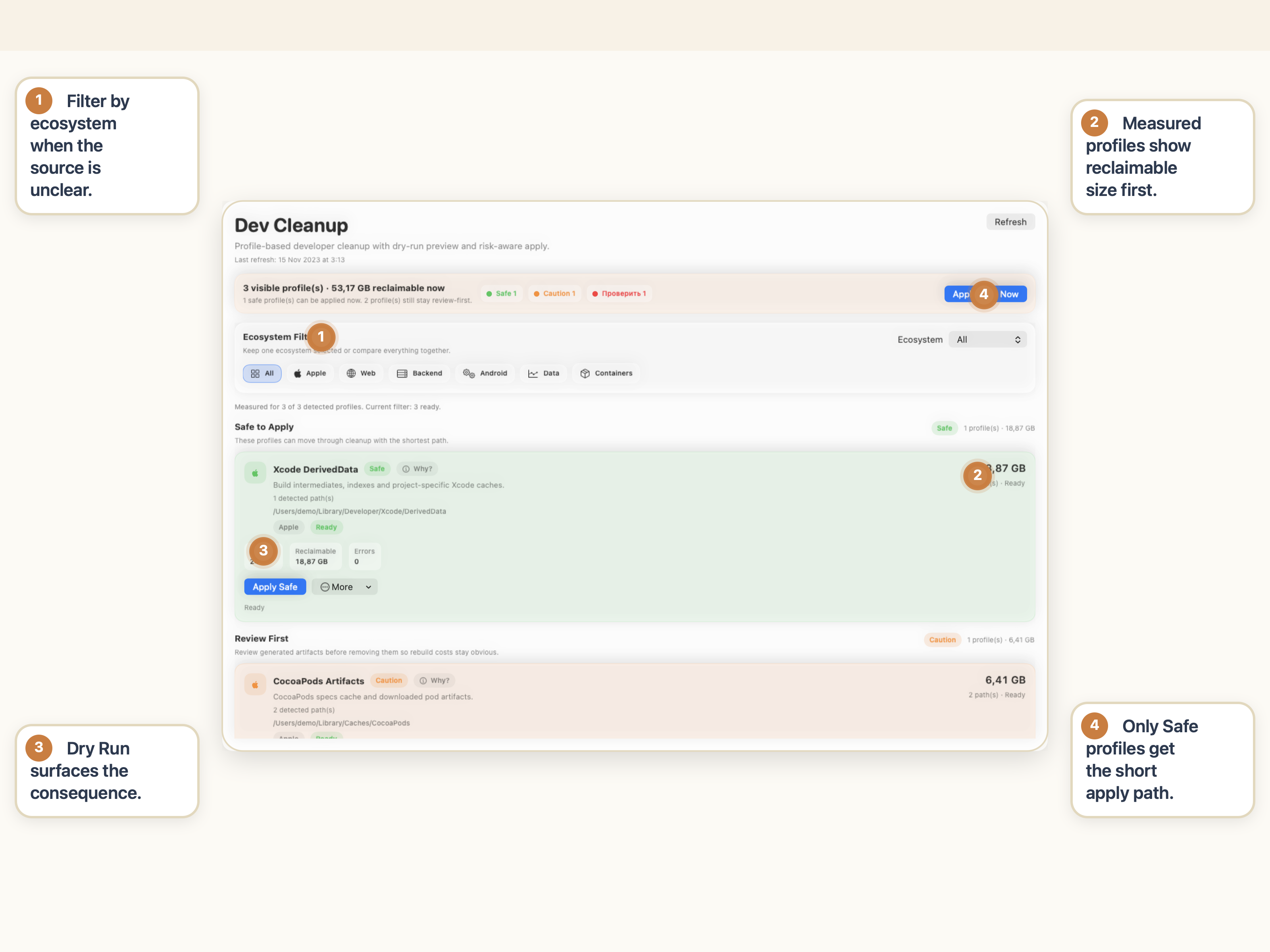
StorageRadar treats developer cleanup as a profile-aware workflow, not as arbitrary file deletion.
That is the product difference. StorageRadar is not just showing that developer storage is large. It is helping you decide which cleanup paths are straightforward, which ones need review, and which ones deserve an explicit risk boundary.
If Apple-side developer storage is your main issue, the Xcode-specific guide Xcode DerivedData Taking Too Much Space on Mac? What to Clean First is the best next read.
Use a risk-aware cleanup workflow for developer environments.
See Dev CleanupConclusion
Developer caches should not be cleaned by guesswork.
The safer approach is to review them by ecosystem, by risk, and by likely consequences. Some are mostly time-cost rebuilds. Some are cautionary. Some deserve a much slower, more explicit cleanup path.
That is why a risk-aware developer cleanup workflow is better than deleting everything under a technical-looking folder and hoping the environment comes back cleanly.
Frequently asked questions
Is it safe to delete everything in ~/Library/Developer on Mac?
Usually not as a blanket rule. Some developer storage is generated and easier to rebuild, while other paths may preserve simulator state, archives, device support assets, or workflow-specific data you still need.
Why do developer Macs run out of disk space so quickly?
Developer machines accumulate build artifacts, indexes, SDKs, simulator data, package caches, Docker images and volumes, container runtime data, and other tooling output that grows quietly over time.
What does it mean to clean developer caches by risk?
It means separating safer generated caches from cautionary or workflow-sensitive storage before cleanup. The goal is to avoid treating every large developer path as if it had the same rebuild cost or consequence model.
Why is preflight more important than delete for dev cleanup?
Preflight helps surface blockers, warnings, and likely consequences before cleanup. That matters on developer machines because the wrong cleanup can remove persistent state, slow builds, or disrupt active environments.
Why is Docker different from ordinary cache folders?
Docker storage is not just a folder of disposable files. It includes runtime-managed images, layers, volumes, and container state, and on Mac cleanup is safer when it goes through Docker-aware prune workflows instead of direct folder deletion.
How do I clean developer caches on Mac safely?
Start with a developer-focused scan, review profiles by risk, inspect items before acting, run a dry run first, use guided preflight for higher-risk paths, and only then apply cleanup where the consequences are acceptable.