If npm cache and old node_modules folders are taking up space on your Mac, separate the shared npm cache from project-local dependencies first. Review the cache before clearing it, then delete stale node_modules folders only when you are ready to reinstall or no longer need that project intact.
That distinction matters because npm cache and node_modules solve different problems. They also carry different cleanup consequences.
One is a reusable package cache. The other is the dependency tree your project actually runs against. Treating them like one disposable blob is how developers reclaim space quickly and then lose time rebuilding the wrong environment.
Main rule: Clear shared cache for space. Remove node_modules only when the project-level rebuild cost is acceptable.
Quick answer
- Check whether the real problem is
~/.npm, project-levelnode_modules, or both. - Use
npm cache verifybefore you jump to a full cache wipe. - Use
npm cache clean --forceonly when reclaiming disk space is worth the re-download cost. - Delete
node_modulesonly in projects you can safely reinstall or no longer actively need. - Review old repos, archived branches, and abandoned demos before touching active workspaces.
- If npm is only one part of the problem, review developer storage by ecosystem instead of folder size alone.
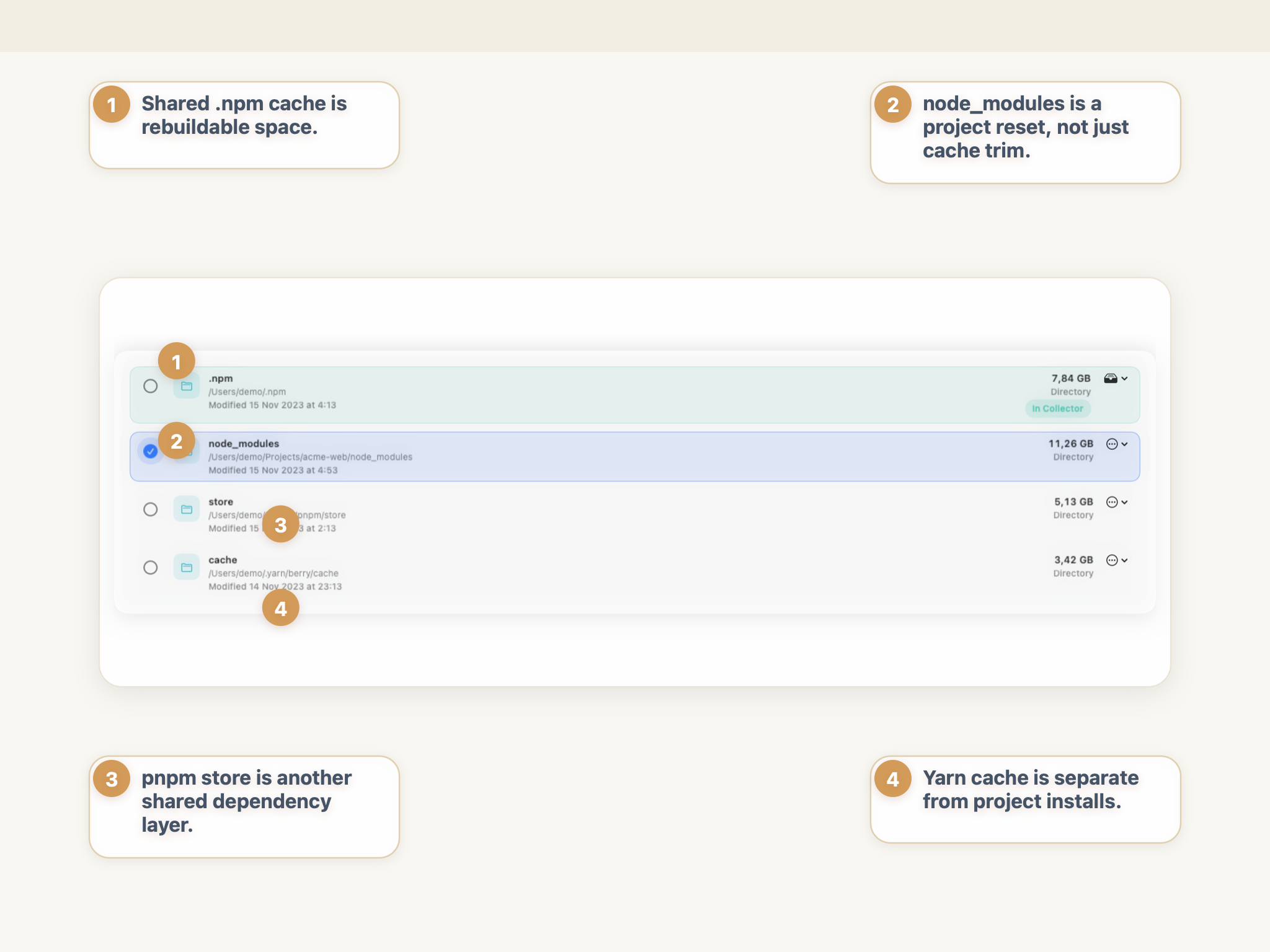
node_modules look similar in size pressure, but they are not the same cleanup decision.
Why npm cache and node_modules grow so quickly on Mac
JavaScript developer machines rarely grow from one project alone. The real pattern is accumulation.
You install packages across multiple apps, branches, prototypes, and client repos. npm keeps a reusable cache so installs do not need to fetch everything from scratch every time. Each project also keeps its own local dependency tree in node_modules.
That means disk growth can come from two directions at once:
- a shared npm cache that keeps expanding as you install new packages and versions;
- multiple project folders, each with its own
node_modulestree; - duplicate or near-duplicate dependencies across old repos;
- native modules and toolchain packages that add rebuild cost even when they are technically disposable;
- stale projects that were never archived, deleted, or reinstalled cleanly.
The result is familiar: one repo is annoying, ten repos are expensive, and a year of normal work turns into a quiet storage problem.
npm Cache vs node_modules: What is the difference?
This is the distinction that matters most.
According to the official npm docs, cache files live in ~/.npm on Posix systems by default, while local installs go into ./node_modules under the current package root. npm loads packages into the cache first, then unpacks them into node_modules for the project that needs them.
| Item | Typical location on Mac | What it is for | Safe by default? | Main cleanup consequence |
|---|---|---|---|---|
| npm cache | ~/.npm | Shared package download cache used by npm | Usually yes, if the goal is reclaiming disk space | Future installs may need to download packages again |
| node_modules | project-root/node_modules | The installed dependency tree for a specific project | Context-dependent | The project will need reinstall, rebuild, or relink work before it runs normally |
That is why “npm is taking space” is usually too vague to be actionable. You need to know whether the pressure comes from the shared cache, old project installs, or both.
What npm’s own docs imply
The npm cache is designed as a cache, not as your project’s working dependency tree. npm explicitly documents it as a cache that can be repopulated later.
node_modules is different. That folder is where your project’s packages, executables, and local dependency graph actually live. If you remove it, you are not just clearing a cache. You are removing the installed dependencies the project currently uses.
Is it safe to delete npm cache on Mac?
Usually yes, but the reason matters.
The official npm docs say the cache is integrity-verified and that clearing it should generally only be necessary when the goal is reclaiming disk space. That is an important framing difference. The npm cache is not supposed to be treated as precious state, but it also is not something you need to wipe routinely just because it exists.
The safe mental model is:
- if your Mac is tight on space, cache cleanup can be a reasonable tradeoff;
- if your installs are working normally, wiping the cache is often unnecessary;
- if you clear it, expect later installs to download packages again;
- if you only want to check the cache state first, use
npm cache verify.
Better first move: verify before clean
npm documents npm cache verify as the offline verification step for existing cache contents. That makes it the better first command when you want a lower-risk check before reclaiming space.
npm cache verifyIf your goal is specifically to free disk space, npm’s documented cleanup command is:
npm cache clean --forceThe --force flag is required by design. npm treats cache clearing as an intentional disk-space decision, not an everyday maintenance habit.
Is it safe to delete node_modules on Mac?
Sometimes, but this is where context matters much more.
Deleting node_modules removes the local dependency tree for that project. If the project is active, the immediate consequence is usually obvious: scripts stop finding packages, local binaries disappear from node_modules/.bin, and the next install or build may take longer than you want.
That does not mean you should never remove it. It means you should remove it deliberately.
Good candidates for deleting node_modules:
- an old project you no longer actively run;
- a stale demo or prototype you can rebuild later;
- a repo you are about to reinstall cleanly anyway;
- a project with a trustworthy lockfile where reinstall is expected and acceptable.
Higher-friction situations:
- an active work repo right before a deadline, demo, or release build;
- a project with native modules that take time to rebuild;
- a workspace you have not touched in months and may not remember how to restore quickly;
- a repo without a clean dependency story or without the lockfile you expect.
Project cleanup rule: deleting node_modules is a workspace reset, not a harmless cache trim.
Why old node_modules folders hurt so much
One project can be manageable. The real waste comes from having many of them.
Every old repo can keep a full dependency tree, package-manager metadata, optional native packages, framework toolchains, and version-specific artifacts. That is why developers often think npm is the problem when the bigger offender is actually a pile of forgotten node_modules folders across retired repos.
How to clear npm cache manually
If you want the manual route, keep it narrow and explicit.
1. Check the active cache directory
If you changed npm config at some point, your cache may not be in the default location. Ask npm first:
npm config get cache2. Verify the cache before deleting it
Use the documented verification step first:
npm cache verify3. Clean the cache only if you actually want the space back
If reclaiming disk space is worth the later re-downloads:
npm cache clean --force4. Recheck the size if needed
Once you know the cache path, you can inspect its size directly:
du -sh "$(npm config get cache)"This is the safer sequence because it separates location, verification, and cleanup into distinct decisions.
How to find old node_modules folders before deleting anything
This is usually the higher-value cleanup pass.
Start with the projects you no longer actively build. That matters more than chasing the single biggest folder in Finder with no context.
Use a review order like this:
- Search your main projects directory for
node_modulesfolders. - Check which repos are stale, archived, or easy to reinstall.
- Confirm whether the project still needs to run locally this week.
- Delete only the
node_modulesfolders whose rebuild cost you understand.
If you want a Terminal-assisted review, use commands that show you where those folders actually are before you delete anything:
find ~/Projects -type d -name node_modules -prune -print
find ~/Projects -type d -name node_modules -prune -exec du -sh {} +
That is still manual, but it is better than reacting emotionally to one huge work folder.
What to review before deleting a project’s node_modules
- Is the repo still active?
- Do you have the lockfile you expect?
- Are there native modules or codegen steps that make reinstall slower?
- Is the project part of a monorepo or workspace setup you do not want to disturb casually?
- Would archiving or deleting the whole retired project be a better cleanup move than only removing
node_modules?
Often the strongest cleanup action is not “wipe dependencies everywhere.” It is “delete the old project you do not need anymore.”
What about yarn, pnpm, and bun caches?
Keep this part separate from npm.
If the project uses another package manager, use that package manager’s own cleanup model instead of assuming npm commands apply cleanly.
Yarn
Modern Yarn documents yarn cache clean as the command that removes shared cache files. It also exposes --mirror and --all for broader cleanup scopes.
yarn cache cleanpnpm
pnpm uses a store model rather than npm’s exact cache pattern. The official pnpm docs describe pnpm store prune as removing unreferenced packages from the store and note that future installs can download removed packages again when needed.
pnpm store pruneBun
Bun documents a global package cache at ~/.bun/install/cache by default. Its docs also note that packages are still copied into node_modules after download, so Bun can create the same “cache plus project install” confusion if you only look at folder size.
The important part is not to memorize every command. It is to avoid mixing storage models. npm cache, Yarn cache, pnpm store, and Bun cache are related problems, not identical ones.
Why developer cleanup is safer when you review by ecosystem
node_modules is rarely the only developer storage problem on a Mac. It usually sits beside Xcode data, simulator storage, Docker images, build cache, logs, and other toolchain-specific paths.
A plain file browser shows that a folder is large. It does not tell you whether it is:
- a rebuildable npm cache;
- an active workspace dependency tree;
- a pnpm store;
- a Docker cache;
- or a different ecosystem that just happens to live near your projects.
That is why developer cleanup works better when the workflow stays ecosystem-aware.
If your real situation is “npm plus Docker plus old Xcode data plus too many stale repos,” that broader review-first model is more useful than chasing one folder at a time.
Bottom line
If npm cache and node_modules are taking up space on your Mac, do not treat them like the same cleanup target.
Use npm cache verify and, when reclaiming space is the actual goal, npm cache clean --force for the shared cache. Review old node_modules folders project by project, and delete them only when you understand the reinstall cost.
That is the safer path: separate cache from workspace state, review stale projects before active ones, and keep developer cleanup tied to ecosystem context instead of blind folder deletion.
Frequently asked questions
What is npm cache on Mac?
npm cache is the local package download cache npm keeps on your Mac, usually under ~/.npm unless you changed the cache config. It is different from project dependencies stored in node_modules.
Is it safe to delete npm cache on Mac?
Usually yes if your goal is to reclaim disk space. npm's own docs position the cache as rebuildable and recommend clearing it only when space recovery is the real reason, because future installs can download packages again.
Is it safe to delete node_modules on Mac?
Sometimes, but only in context. Deleting node_modules removes the installed dependencies for that project, so you should do it only when you are ready to reinstall or when the project is stale enough that the rebuild cost does not matter.
Why do old node_modules folders take so much space?
Every project can keep its own dependency tree, build-related packages, native modules, and version-specific artifacts. Across many repos, that duplicated local install footprint adds up quickly.
What is the difference between npm cache and node_modules?
npm cache is npm's shared download cache, while node_modules is the project-local dependency folder your app actually runs against. One is a reusable cache; the other is the installed dependency tree for a specific project.